2. The dashboard
Who: everyone. The numbers you see depend on your role.
The dashboard is the first screen after you sign in. It gives you a quick overview and two shortcuts for starting to write.
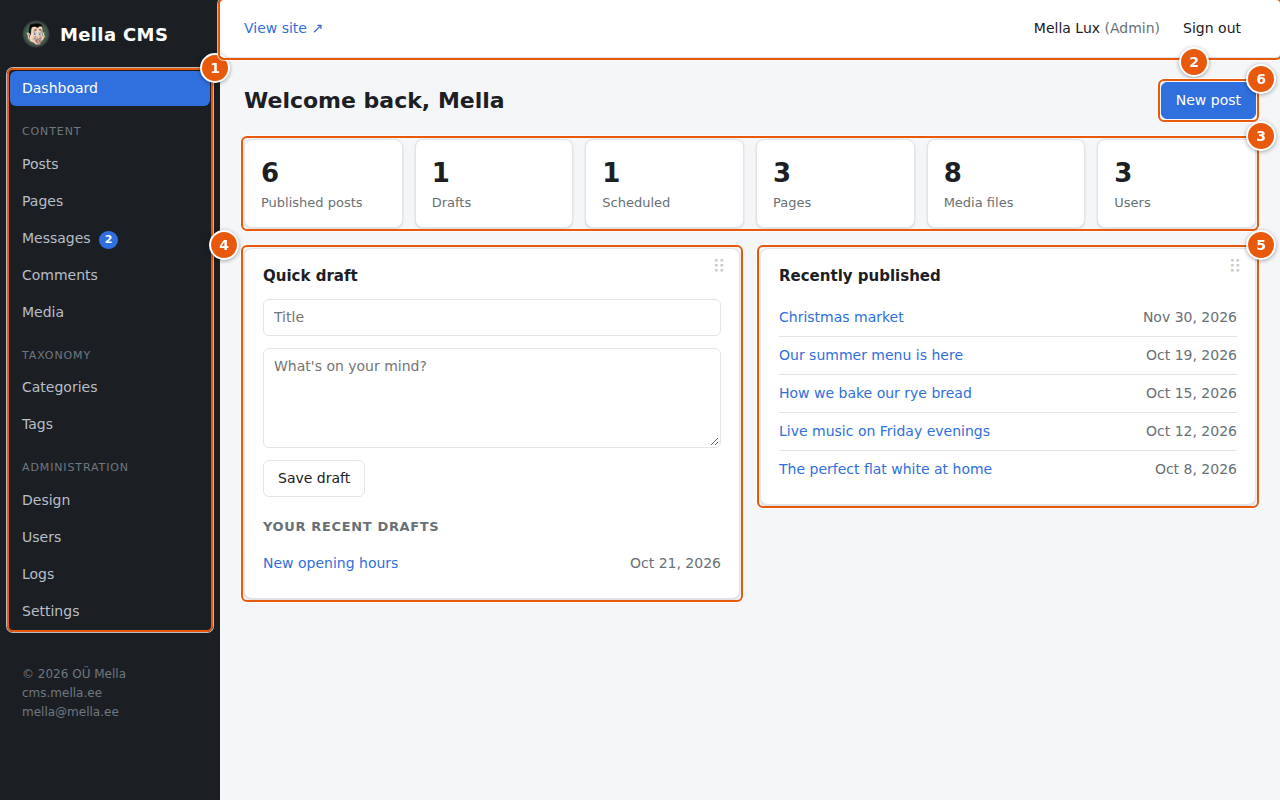
- The menu: go to any part of the admin. See Getting started.
- The top bar: View site, your profile and Sign out.
- The counters. Each one is also a link to the matching list:
- Published posts, Drafts and Scheduled open the post list with that filter already chosen.
- Pages, Media files and Users open those screens. Authors do not see the Pages and Users counters.
- Quick draft: type a title and a few thoughts, press Save draft, and the idea is stored as a draft post. Open it later from Your recent drafts to finish it. This is handy when you only want to jot something down.
- Recently published: the latest posts. Click a title to open it in the editor.
- New post: opens an empty editor. See Posts.
The panels of the dashboard are cards that you can move to a place you like; see Moving the cards.
A quick draft is saved as simple text. Open it in the editor to add headings, pictures and other formatting.